 Conditioning Control Panel
Overview
A phrase appears in the centre of your screen in big magenta letters, holds for about a tenth of a second, and fades. That's the whole feature. It runs on a timer in the background while you do something else, and you can add a whispered voice clip for each phrase.
It is the lightest of the core tools. Nothing is blocked, nothing is fullscreen, nothing has to be clicked. On default settings you get roughly one flash every twelve seconds.
Photosensitivity notice
Turned up, this feature flashes text 30 times a minute, about a fifth of a second each time, bright magenta on a black card with a white outline, in the centre of every connected monitor at once.
Flashing and high-contrast moving imagery can trigger symptoms in people with photosensitive epilepsy or related conditions. If that applies to you, or you do not know whether it does, be careful with this one. The controls that reduce it: Enable switches the feature off and is off to begin with, Per Min decides how often a flash arrives, Opacity takes the text down from solid, the colours are editable under Advanced if magenta on black is too hard, and Multi Mon off in System settings keeps it to your primary screen. The panic key, Escape unless you change it, stops the engine from any window.
About the word "subliminal"
The flashes are short but they are not invisible, and this is not a claim that anything gets past your conscious mind. Treat it as a repeated reminder that you don't have to stop and read. What it actually does is repetition, in your peripheral vision, while your attention is elsewhere.
Text Flashes
Centred, big, gone in a blink
Audio Whispers
A matching voice clip per phrase
Your Own Words
Edit or replace the whole list
Haptic Sync
A pulse on every phrase
Text Settings
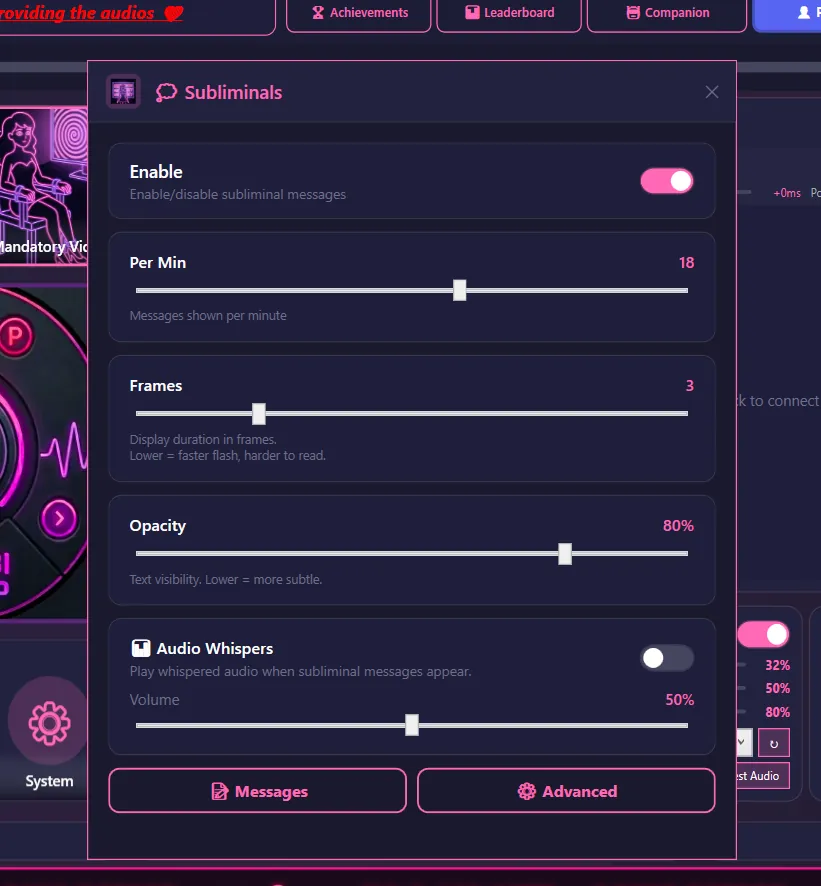
| Setting | Range | Default | What it does |
|---|---|---|---|
| Enable | On/Off | Off | Turns subliminal messages on or off |
| Per Min | 1-30 | 5 | Roughly how many phrases flash each minute |
| Frames | 1-10 | 2 | How long each phrase holds. Lower = harder to read |
| Opacity | 10-100% | 80% | How solid the text looks. Lower = more subtle |
How the timing really works
- Per Min is an average, not a metronome. The gap between flashes is
60 / Per Minseconds, shuffled by up to 30% either way, with a floor of one second. At the default of 5 that's a flash every 8 to 16 seconds - Frames is roughly 17 milliseconds per step, but the app never shows a phrase for less than 100 ms. In practice settings 1 to 5 all look the same. Only 6 and up stretch it out, topping out at about 170 ms at 10
- On top of the hold there's a 50 ms fade in and a 50 ms fade out, so a default flash is visible for about a fifth of a second in total
Display behaviour
- Text appears centred on screen, in bold Arial at 120pt, with an outline behind it so it stays readable over anything
- Default colours are magenta text on a black card with a white outline. All three are editable under the Advanced button
- With Multi Mon on in System settings, the same phrase flashes on every connected monitor at once. Otherwise it's your primary screen only
- Solid mode (game friendly) is an alternative renderer for when the flashes don't show up over a fullscreen game. Try it if you see nothing while gaming
- Flashes are visible to screen recording and streaming software. If you stream, that is worth knowing before you turn it on
Where to start
Barely there: Opacity 30-50%, Frames 1-2
Noticeable: Opacity 70-90%, Frames 6-7
Read it every time: Opacity 100%, Frames 8-10
Audio Whispers
Turn this on and each flash can play a short whispered clip of the same phrase. The app ships with a recorded clip for every default phrase, so it works straight away.
| Setting | Range | Default | What it does |
|---|---|---|---|
| Audio Whispers | On/Off | Off | Play a whispered clip alongside the text |
| Volume | 0-100% | 50% | Whisper volume, scaled by your master volume |
| Mute Whispers | On/Off | Off | A plain mute, kept separate from the main toggle |
Why there are two off switches
Mute Whispers exists so that audio stays under your control even during a locked session, when the main toggle can be frozen. It is meant to be reachable the way a volume knob is. Use it if the sound becomes a problem and you can't or don't want to end the session.
How it works
- A phrase is picked and about to flash, for example GOOD GIRL
- The app looks for an audio file with that name, for example
GOOD GIRL.mp3 - If it finds one, it plays at your whisper volume and briefly ducks your other audio, restoring it half a second after the clip ends
- If it finds nothing, the text flashes on its own. No error, no gap
Managing Messages
Click Messages on the Subliminals card to open the phrase list.
Default messages
The app ships with 21 phrases, all switched on. They are explicit, and they are written for one specific flavour of conditioning. A sample:
- GOOD GIRL
- JUST OBEY
- DROP FOR COCK
- BAMBI FREEZE
- BAMBI SLEEP
- SNAP AND FORGET
- TURN YOUR BRAIN OFF
This list is a starting point, not a prescription
If the shipped phrases aren't for you, switch them off or delete them and write your own. Nothing else in the app depends on them. Do that before you turn the feature on rather than after - a phrase you didn't choose, repeated for an hour, is the thing most people wish they had checked first.
Editing the list
- Add - type your own phrase. New entries are stored in capitals
- Enable / disable - untick a phrase to take it out of rotation without losing it
- Delete - remove it. Deleted defaults stay gone; they won't quietly reappear on the next update
What works
• Short phrases. One to three words read best at a tenth of a second
• A consistent theme beats a big scattered list
• If you're recording audio, name the file to match the phrase exactly
Sessions can carry their own phrase list, which is swapped in while the session runs and swapped back afterwards. Your global list is left alone.
Adding Audio Files
Whisper clips live in the Resources/sub_audio/ folder inside the app's install directory, alongside the shipped ones. Content mods can supply their own set instead, and the app checks the active mod's folder first.
File naming
Name the file after the phrase it belongs to:
Resources/sub_audio/
├── GOOD GIRL.mp3       # plays for the "GOOD GIRL" phrase
├── JUST OBEY.mp3       # plays for "JUST OBEY"
├── BAMBI FREEZE.mp3    # plays for "BAMBI FREEZE"
└── DROP FOR COCK.mp3   # plays for "DROP FOR COCK"
Matching rules
• Matching ignores capitalisation, and it copes with either kind of apostrophe
• Supported formats: .mp3, .wav, .ogg
• Keep clips short. One to three seconds suits the pacing
• The folder listing is cached for about a minute, so a file you just dropped in may take a moment to be picked up
If the app is installed in Program Files
Windows may block writing into the install folder. If you can't drop files in, either run the folder open as administrator, or use a content mod folder, which lives somewhere writable.
Making your own whispers
- Record yourself - a phone voice memo, whispered close to the mic, is genuinely fine
- Text to speech - services like ElevenLabs or Azure TTS
- Process existing audio - apply a whisper or breath effect to a clip you already have
Haptic Synchronization
If you have a toy paired, every subliminal can fire a pulse at the same moment the text appears.
Supported devices
Works with Lovense devices and anything Buttplug.io supports. Pairing and per-event routing are covered in haptics.txt.
How it works
- The pulse is fired slightly before the text so the two land together. The app allows for the lag on your connection type, which is longer over Buttplug than over Lovense
- Pulse length follows the wording. Phrases with "cum", "collapse" or "drop" get a longer buzz, "freeze" and "zap" get a short sharp one, everything else sits in the middle
- Subliminals are their own row in the haptics routing table, so you can set intensity and pattern for them separately, or switch them off there while leaving the text running