 Conditioning Control Panel
Overview
Most of CCP happens in a session, in its own window, on purpose. The Awareness Engine doesn't. It sits in the background, watches for words you chose, and reacts wherever you are: a browser tab, a chat, a document, a game.
You give it a word. You give it one or more things to do when that word turns up. That's the whole idea. The rest of this page is the detail.
- Two ways of noticing - it can read text off your screen, and it can watch what you type.
- Ready-made packs - four themed sets of words and reactions you can install in one click.
- Mix and match reactions - each word can fire any combination of eight kinds of action.
- Word highlighting - matched words get a coloured box drawn around them on screen.
- Anti-loop protection - several layers of it, so the app can't set itself off in circles.
Patreon Required
The Awareness Engine needs an active Patreon subscription. Any tier will do.
Read this before you switch it on
This feature watches your screen and your keyboard, everywhere, not just inside CCP. There is no separate consent dialog: the master switch is the consent. Two things follow from that, and you should know both.
The panic key does not stop it. The panic key clears effects and stops the session engine; it leaves the Awareness Engine running. To stop it, switch the master toggle off on the Awareness tab (or say "keyword triggers off" if you use voice commands). Quitting the app also stops it.
It does not survive a restart. The master switch is deliberately not saved. Every time you launch CCP it starts off, and you have to turn it on again by hand. It cannot quietly resume watching without you knowing.
Signal Sources
Two ways it can notice a word. You can run either, both, or neither.
Screen OCR
OCR just means "reading text out of a picture". Every few seconds the app takes a snapshot of your screens, reads the words in it, and checks them against your list. This is what catches words you're looking at rather than words you're writing: web pages, chat, documents, games.
- Scans every 3 seconds by default, adjustable from 2 to 10.
- Covers all your monitors.
- Each word on screen fires once. It won't nag you about the same word sitting in the same place.
- Small shifts in position (from typing above it, or a slight scroll) don't count as a new word.
- When it thinks it has found something, it quickly re-scans to confirm before firing, so a flicker or a rendering glitch doesn't set anything off.
- CCP's own windows are ignored by default, so she can't read her own speech bubble and react to it.
Your screen never leaves your computer
The screenshot is held in memory, read by the text-recognition feature built into Windows, and thrown away. It is never written to disk and never uploaded, not to us and not to anyone else. There is no cloud OCR service involved at any point.
The one thing that can travel: if a trigger is set to make the avatar comment, and your Companion is using cloud AI, the matched word is sent to the AI so she has something to say about it. Not the screenshot, not the surrounding text - just the word. Running local AI keeps even that on your machine.
If nothing ever fires from OCR
Screen reading uses a Windows language pack. If your Windows install doesn't have one, the feature quietly does nothing rather than complaining. Add a language pack in Windows settings and it starts working.
Keyboard
Keeps a short rolling record of what you've typed and fires the moment you finish a trigger word. No waiting for the next screen scan.
- Remembers the last 200 characters, and no more.
- Clears itself after 3 seconds of not typing (adjustable from 1 to 10 seconds).
- Matches whole words only, so typing "sit" won't fire from "intensity".
- Multi-word triggers match words typed one after another.
How matching works
Plain words ignore capitals and only match whole words. Punctuation stuck to the edges is ignored, so "sit." and "sit" both count. Patterns (regular expressions) are also supported if you want to catch every form of a word at once; each one gets a tenth of a second to run, and anything slower is abandoned so a bad pattern can't freeze the app.
Built-in Presets
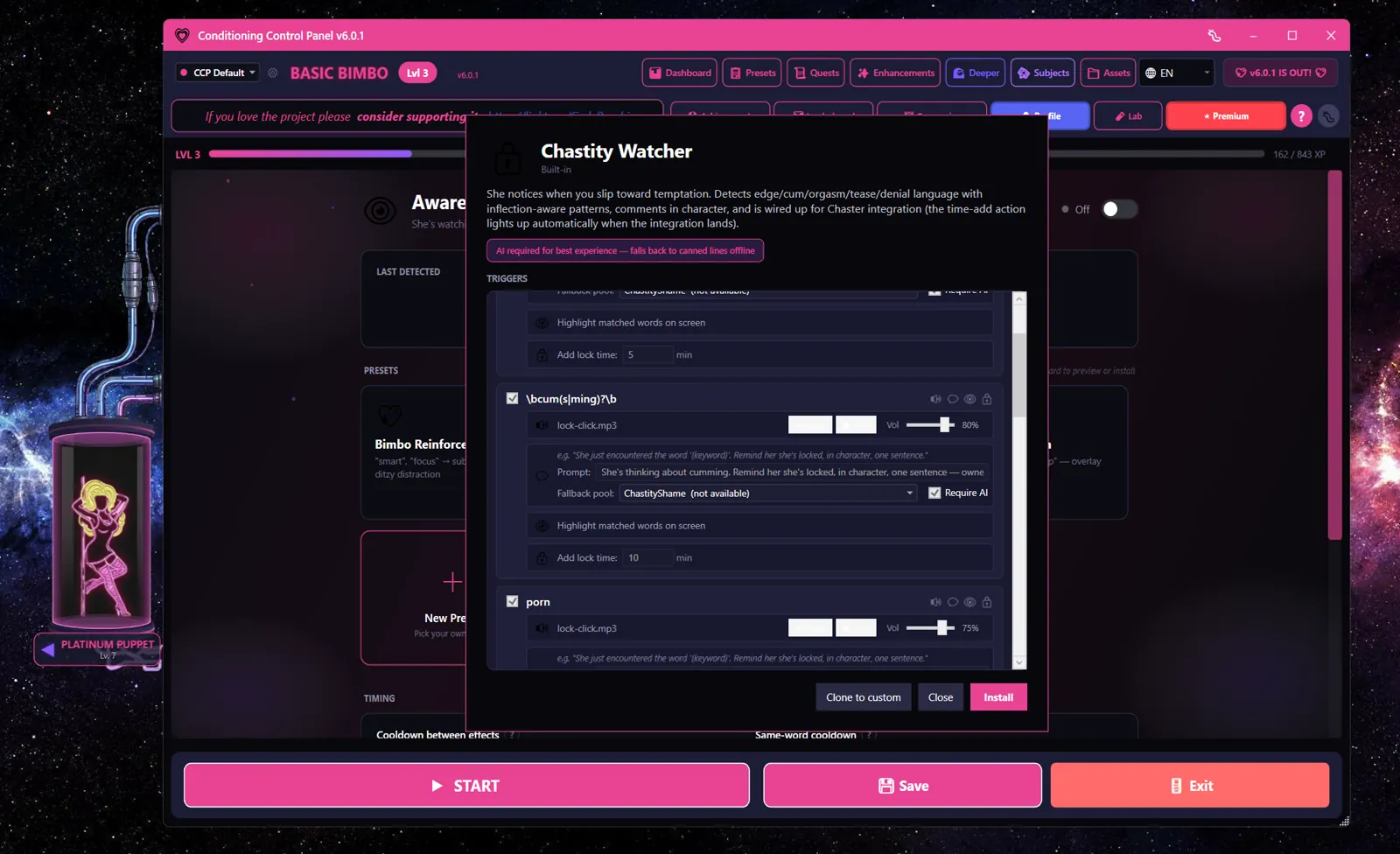
Four themed packs ship with CCP, eight trigger words each. Install one with a single click from the Awareness tab, then edit anything you don't like.
Puppy Pet
Good boy/girl commands - clicker sounds and praise
Answers pet-play commands with a clicker sound, praise from the avatar, a haptic tap and some XP. Works fine without AI: it ships with 18 written praise lines to fall back on.
good boy
good girl
sit
stay
fetch
treat
obedient
collar
Chastity Watcher
Temptation detection - lock clicks and scolding
Catches temptation words and answers with a lock-click sound and a scolding or a tease. Half its triggers are patterns rather than plain words, so "edge" also catches edges, edged and edging.
This is the one preset that really wants AI. Its comments are written by the Companion in the moment, so without an AI brain it has much less to say.
edge
cum
porn
orgasm
release
tease
denied
horny
Bimbo Reinforcement
"Smart" words trigger subliminal flashes and ditzy distractions
Chimes and flashes a subliminal every time you type or see an intelligence word. The heavier ones escalate: "study" spawns bubbles, "concentrate" fires a Mind Wipe. Ships with 18 giggly fallback lines.
smart
focus
think
intelligent
work
study
concentrate
remember
Trance Induction
Hypnotic words trigger overlay pulses and soft mantras
Answers trance words with a bell and a pulse of the overlay. "Empty" is the jackpot: it fires a Mind Wipe, on a five-minute cooldown of its own. Ships with 18 soft hypnotic fallback lines.
relax
deeper
sleep
drop
breathe
trance
empty
spiral
Action Types
Every trigger word can fire any combination of the eight actions below. If two words match on the same screen scan, their actions are merged so you don't get everything twice.
PlayAudio
Plays a clip - a clicker, a chime, a bell, whatever you point it at. You control the volume, how many times it repeats and the gap between repeats. It can duck your other audio while it plays.
VisualEffect
Fires something on screen. Choose from SubliminalFlash, ExactSubliminal (flashes the matched word itself), ImageFlash, OverlayPulse, MindWipe or Bubbles. There's also HighlightOnly, which draws the box and nothing else.
Highlight
Draws a coloured box around the matched word where it sits on screen. Colour and duration are yours to set.
Haptic
Buzzes a connected toy. Needs Haptics set up first. Strength is set per action, from 0 to 100%.
AvatarComment
Makes the avatar say something. Uses AI with a prompt you can edit (write {keyword} where you want the matched word to appear), and falls back to written lines when there's no AI available.
AddXp
Awards 0 to 100 XP. Multiplied while a session is running, by 1.5x unless you change it.
ExtendSession
Meant to add minutes to the running session. Not built yet - it records the intent in the log and does nothing else.
ChasterAddTime
Meant to add time to a Chaster lock. Not built yet - the Chaster integration doesn't exist. The Chastity Watcher preset is configured to use it, so those triggers currently only make noise.
What happens when two words match at once
Say "sit" and "stay" are both on screen in the same scan. Audio plays once, from whichever trigger came first. Highlights are drawn for both words. Different visual effects all fire, but the same effect twice only fires once. The idea is that a busy screen shouldn't produce a pile-up.
Word Highlighting
When screen reading catches one of your words, a coloured box appears around it, right where the word is.
- Colour - neon pink by default (
#FF69B4), with a set of swatches to choose from. - Duration - 1.5 seconds by default, anywhere from 0.3 to 5 seconds.
- Mode - box every new match, or only a random handful per scan if you want it subtler.
- Invisible to capture - by default the boxes are hidden from screen recording and streaming software. That's partly for your privacy and partly practical: if they showed up in the next screenshot, the app would read its own highlights and set itself off. There's a toggle if you actually want them on stream.
One word, one fire
Each word in each place fires once while it's visible. Scroll it off the screen and back on and it becomes fair game again.
Preset Editor
Installing Presets
- Open the Awareness tab.
- Look through the presets.
- Hit Install to add that pack's words to your active list.
- Use the master switch to turn the whole engine on and off.
Managing Presets
- Uninstall - takes that pack's words back out of your active list.
- Clone - makes your own copy to mess with, leaving the original alone.
- Updates - the four built-in packs update themselves when a newer version ships with CCP. Your clones don't, which is rather the point of cloning.
Custom Triggers
Adding your own:
- On the Awareness tab, click the + New Preset card at the end of the preset row, or open a preset you already installed.
- In the preset editor, click + Add trigger at the bottom of the trigger list.
- Type the word, or a pattern if you want to catch several forms at once.
- Add one or more actions - audio, visual, haptic, and so on.
- Set how long that word has to wait before it can fire again.
- Save and switch it on.
Safety Features
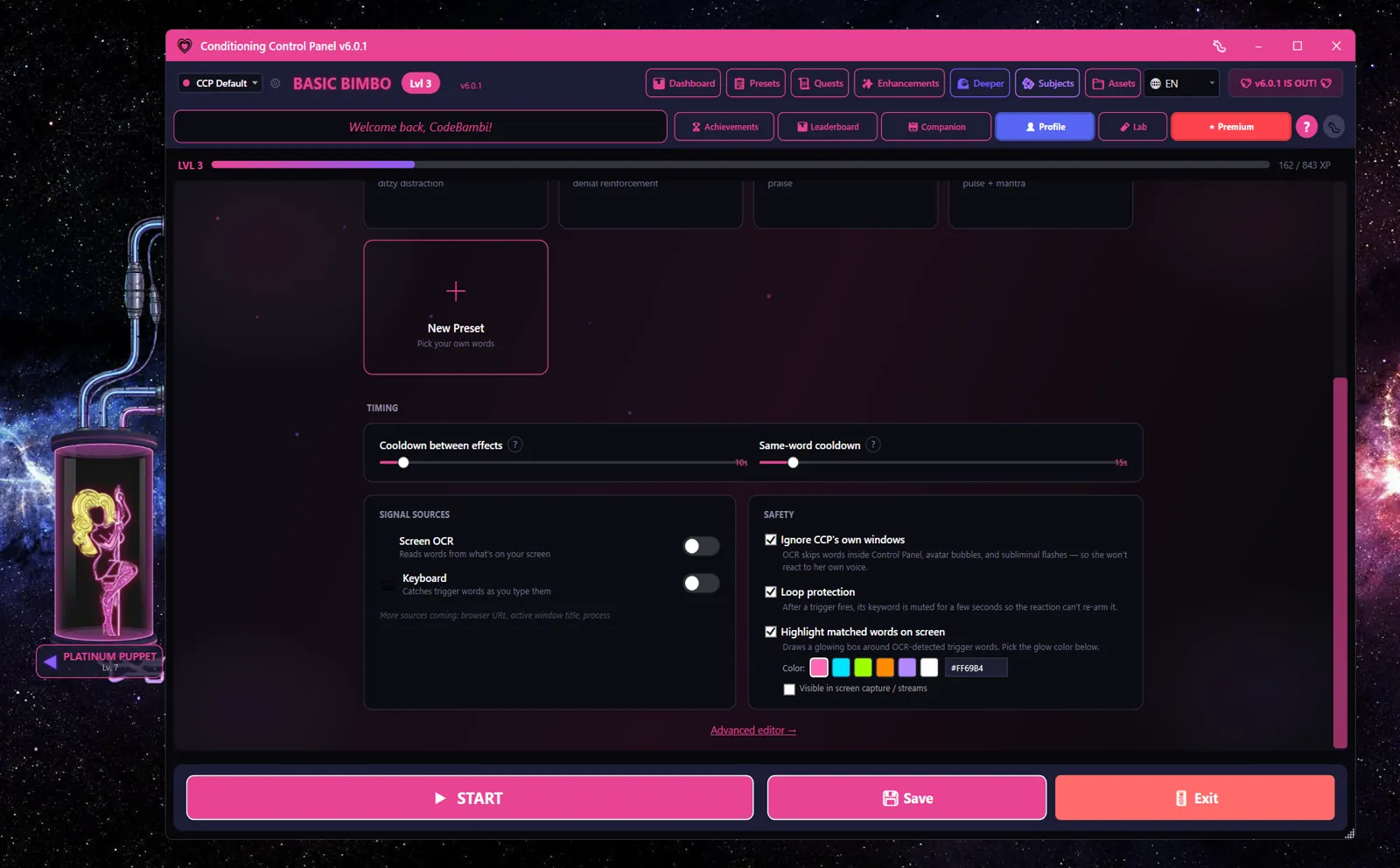
A trigger that fires a subliminal, which the screen reader then sees, which fires the trigger again, is a loop that ends with your afternoon gone. Several layers exist to stop exactly that, plus a couple to keep the engine out of places it shouldn't be looking.
Ignore CCP's own windows
Words found inside CCP's own windows are thrown away. Stops her speech bubbles and subliminals from triggering her. On by default.
Loop Protection
After a word fires, it's muted for 5 seconds (adjustable) so its own output can't be read back and start the cycle again. On by default.
Same-word cooldown
A minimum wait between two fires of the same word, from any source. 15 seconds by default. There's no off switch - the lowest you can set it is 1 second.
Cooldown between effects
A minimum wait between any two fires at all, whichever words are involved. 10 seconds by default. Stops one busy screen scan from setting off five things at once.
Whole-word matching
Plain words need proper word boundaries. "sit" matches "sit down" but not "intensity" or "sitting".
Force mute
Actions that put the matched word back on your screen - like ExactSubliminal - automatically mute that word, because they would otherwise be a loop by definition.
Where she may notice
Limit which apps she's allowed to watch: everywhere, everywhere except a list you name, or only in a list you name. Useful for keeping work out of it.
Stay quiet while CCP has focus
A separate toggle that holds everything back while the Control Panel itself is the window you're using. Handy while you're setting your triggers up.
Settings Reference
| Setting | Default | Description |
|---|---|---|
| Awareness Engine (master switch) | Off | Turns all keyword detection on and off. Not saved between launches - always starts off. |
| Screen OCR | Off | Read words off your screen. Only runs while the master switch is on. |
| Keyboard | Off | Catch trigger words as you type them. |
| Scan Interval | 3s | How often the screen is read (2-10s). |
| Buffer Timeout | 3.0s | How long you can pause before the typing buffer clears (1-10s). |
| Cooldown between effects | 10s | Minimum wait between any two fires (1-180s). |
| Same-word cooldown | 15s | Minimum wait between two fires of the same word (1-180s). Cannot be switched off. |
| Session XP Boost | 1.5x | XP multiplier while a session is running (1.0-3.0x). |
| Highlight matched words on screen | On | Draw a coloured box around matches. |
| Highlight Duration | 1.5s | How long the box stays up (0.3-5.0s). |
| Highlight colour | #FF69B4 | Colour of the box. Pick from swatches. |
| Highlight mode | All matches | Box everything, or a random subset per scan. |
| Show highlights in screen capture / streams | Off | Whether the boxes appear in recordings and to the app's own screen reading. |
| Ignore CCP's own windows | On | Throw away matches found inside CCP itself. |
| Stay quiet while Control Panel has focus | Off | Hold everything back while you're using CCP. |
| Loop protection | On | Briefly mute a word after it fires. |
| Loop protection duration | 5s | How long that mute lasts (0.5-30s). |
| Where she may notice | Everywhere | Everywhere, everywhere except named apps, or only in named apps. |